
WORK-PROJECT MANAGEMENT
Design Systems
SaaS Platform
Leadership
Scaling Asio™ Projects — Project Management for MSPs Made Easy
How I led the UX strategy and redesign of ConnectWise PSA's project management experience in Asio — introducing a modernized Work Plan, Gantt chart, and net-new Kanban view on the Asio™ platform — for 25,000+ MSP partners who couldn't afford to miss a deadline.
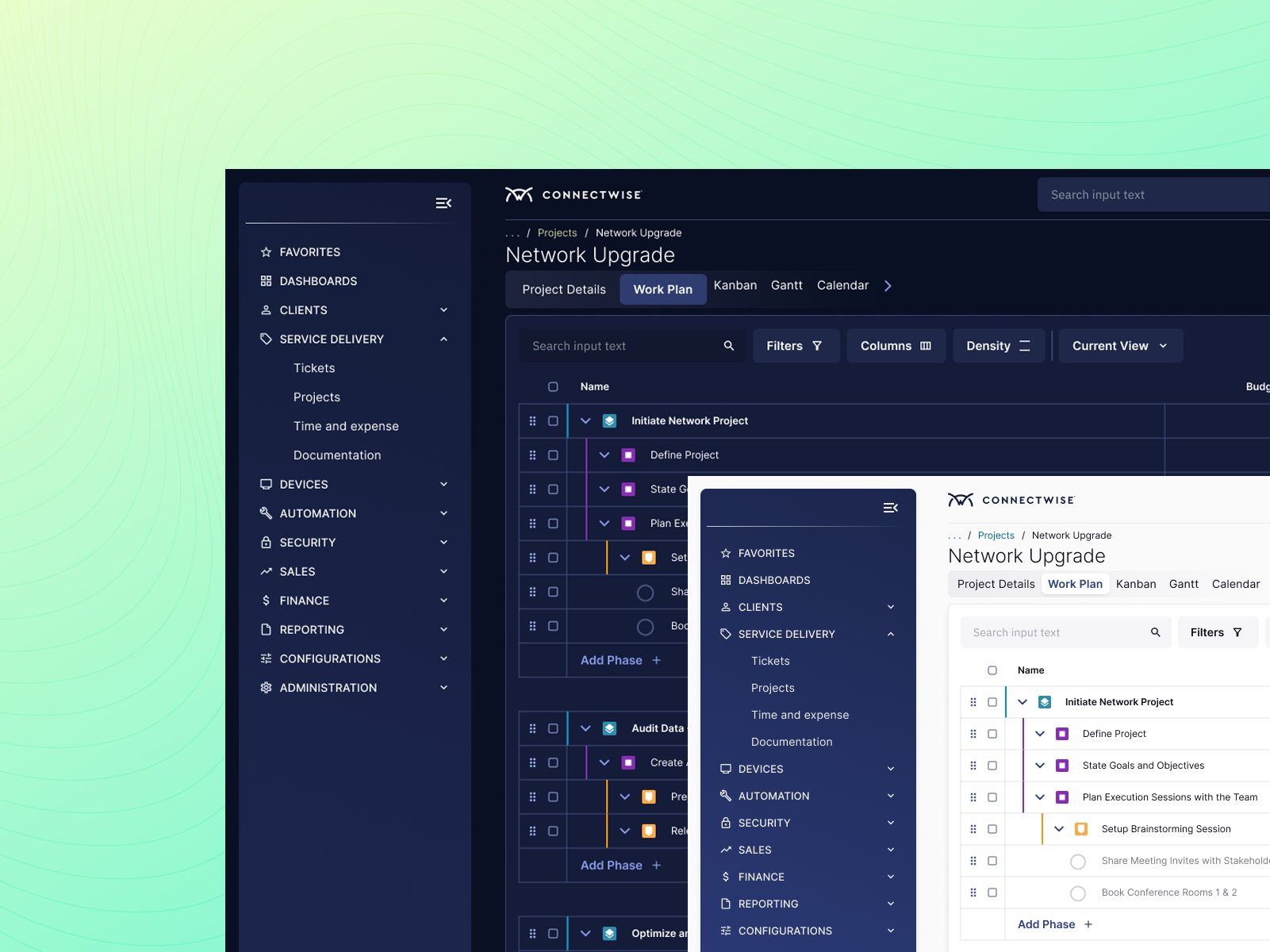
MSPs were running projects across three screens and a spreadsheet. Missed deadlines. No visibility. Real client churn. Our Goal — reinvent to make Asio Projects the only tool they'd ever need.
MY ROLE
UX Leader
PLATFORM
ConnectWise Asio™
SHIPPED
Q1 2025
USERS
25,000+ MSPs
TEAM
Cross-functional
READ TIME
~2 Min ⚡️
⚡ TL;DR — 3 Things We Shipped, 3 Numbers That Matter
✅ Modernised Work Plan
✅ Drag-and-drop Gantt chart
✅ Net-new Kanban board
📈 35% NPS lift on PM features
📈 20% faster project delivery
📈 45% Drop in 3rd Party Tool Use
01
MSPs Were Running Projects on Spreadsheets. In 2023.
Context
ConnectWise PSA is the operational backbone for over 25,000 Managed Service Providers globally — handling ticketing, billing, time tracking, and project management in one platform. For an MSP, a delayed project doesn't just mean internal friction; it means a client's IT infrastructure is the casualty. By 2023, the project management experience in ConnectWise Asio was critically behind. Partners were bolting on third-party tools — TopLeft, Moovila, Monday.com, Asana — to fill gaps that a PSA costing thousands per year should have covered natively. The workaround had become the workflow. The leadership knew it. And the redesign had to start with projects.
🤦🏻♂️
The daily reality for MSP project managers: PSA on screen one, a spreadsheet on screen two, Kanban tool on screen three — all manually kept in sync, all generating duplicate work, all because the PSA they paid for couldn't show them what was happening in their own projects.
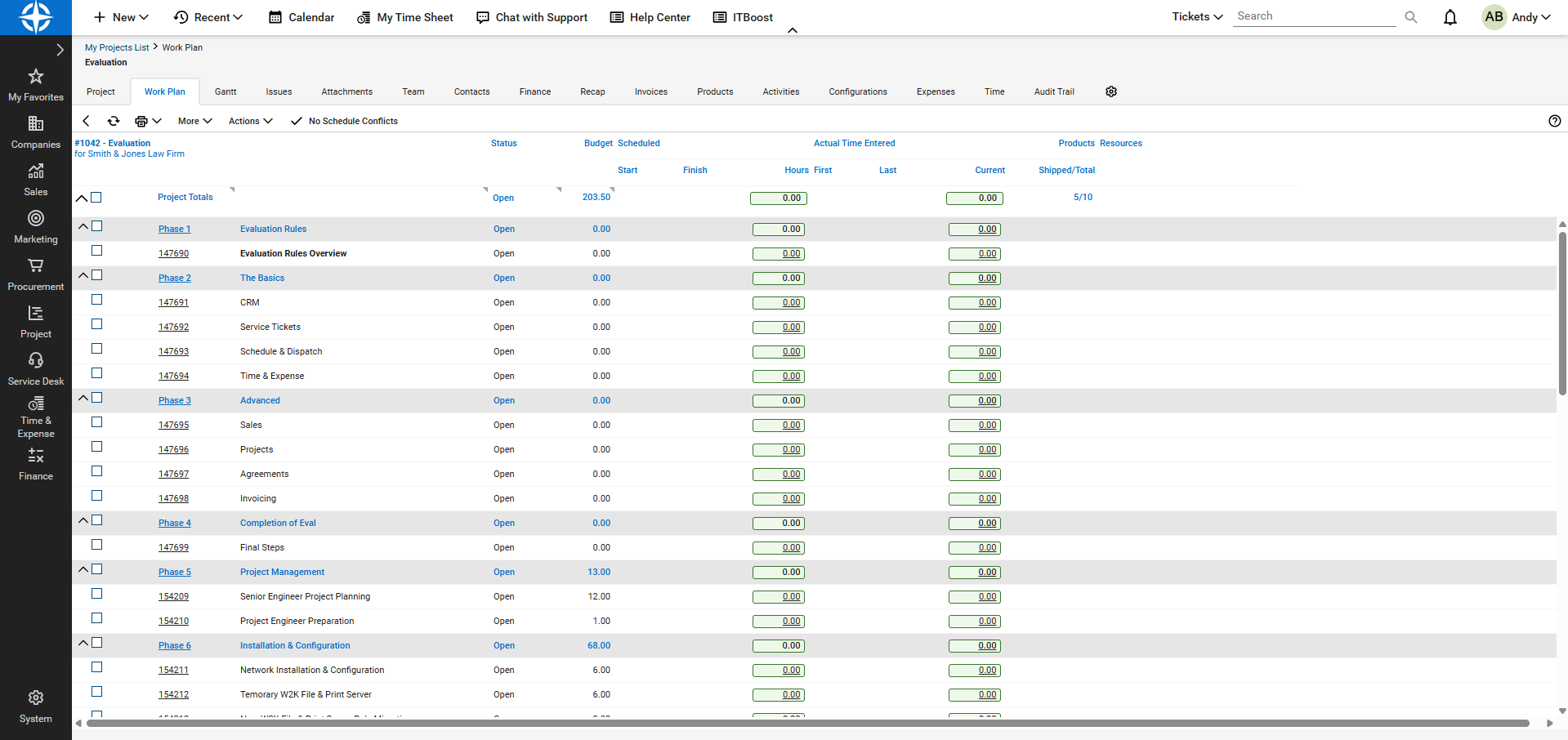
ConnectWise Manage - Project Work Plan (Legacy)
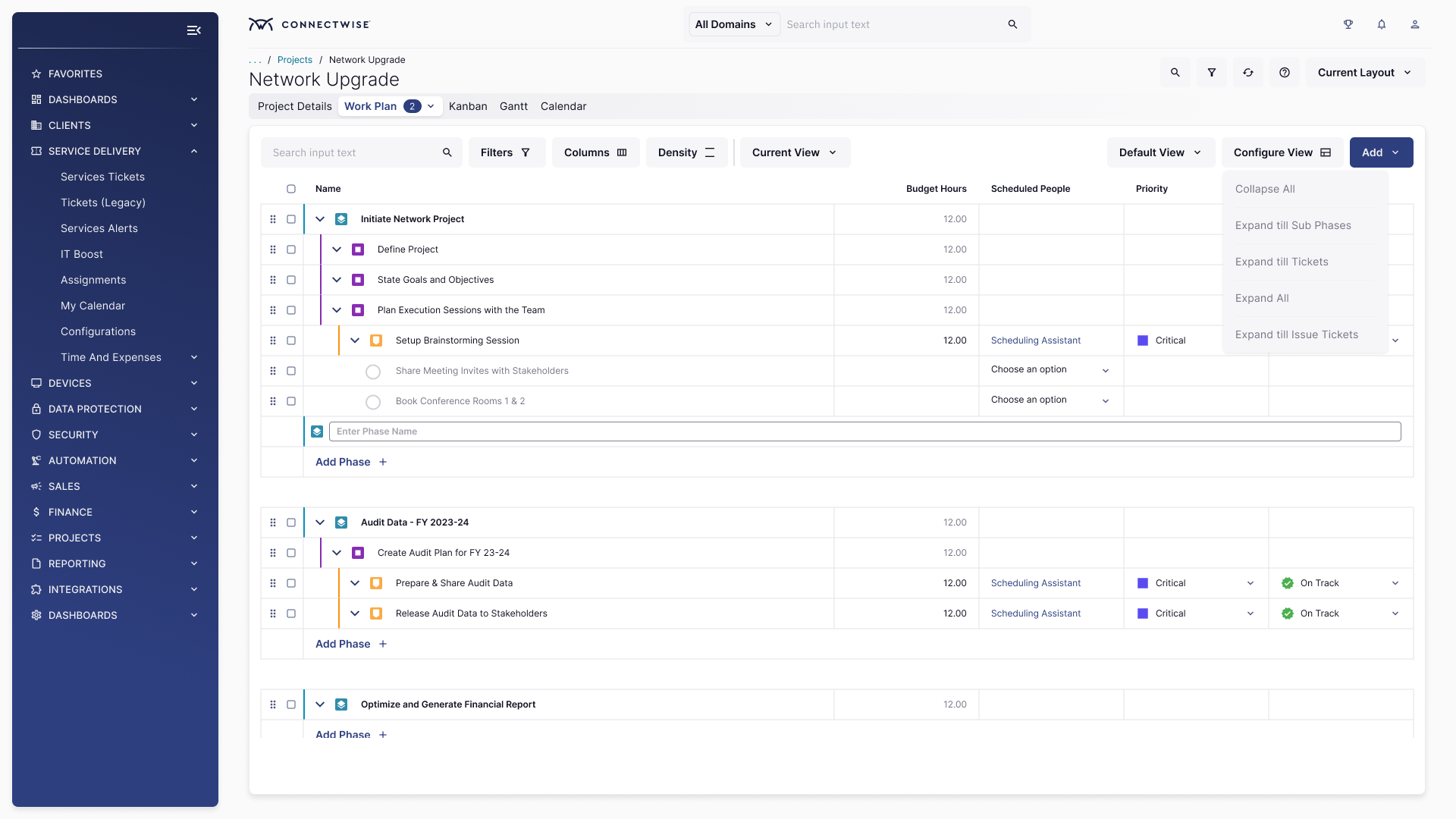
ConnectWise Asio - Project Work Plan (Platform)
"The Flat List of Doom" -
02
UX Lead — Strategy, Research, Design Direction, and Ship
My Role
I was the UX Lead on the Business Management team for the PSA project management reimagination. This wasn't a facelift — it was a ground-up rethinking of how MSP project managers, service coordinators, and technicians experience their daily work, built on the Asio™ platform using the Asio Neon™ design system.
My Responsibilities
UX strategy & vision · User research leadership · Competitive analysis · Design direction & reviews · Stakeholder alignment · Developer handoffs · Usability
validation
Key Deliverables
Research synthesis & journey maps · Wireframes & hi-fi prototypes · Redesigned Work Plan · Gantt chart UX · Net-new Kanban board · Asio Neon™ component contributions
Team
Product Management · Frontend & Backend Engineering · Partner Success · Sales & Pre-sales · QA · Asio™ Platform Team · Asio Neon™ Design System Team
Tools Used
Maze
Marvin
Pendo
MS Copilot
Asio Neon™
Confluence
Jira
Figma
FigJam
03
A PSA That Couldn't Tell You Where Your Projects Were
The Problem
The original project management experience was built for a simpler MSP era — linear lists and phase-based task groupings. As MSPs grew from 5 to 50+ technicians managing concurrent client projects, the tooling hadn't kept up. The business cost was now measurable, and it was accelerating.
What Was Broken
No visual timeline. Project plans were flat lists. No Gantt view meant managers had zero visibility into dependencies,overlaps, or critical path. Every status check required digging through nested phase structures.
Zero native Kanban. MSPs wanting agile-style task management had to bolt on Top Left or Monday.com — then manually sync time entries back to PSA for billing. Double-entry was endemic and killed technician morale.
Invisible resource capacity. No way to see who was overloaded, who was available, or whether the team could realistically deliver the timeline promised to the client. Overpromising was systemic, not accidental.
Rigid, brittle work plans. Mid-project scope changes — inevitable in MSP engagements — required multiple steps and manual recalculation. Every change was a UX tax that burned time and damaged profitability.
A visible competitive gap. Sales reported losing deals to competitors partly on PM UX. Prospects who had seen Monday.com or ClickUp before a PSA demo had higher close friction. "It looks like it's from 2015" appeared in actual sales notes.
🙌🏻
"We moved from negative to +58% project efficiency — completing projects with one third of the time left over." - Steve Psaradellis, CEO of TEBA, via TopLeft testimonial · The gap ConnectWise PSA needed to close natively.
04
Make ConnectWise PSA the Only Tool MSPs Need for Projects
Objectives
The original project management experience was built for a simpler MSP era — linear lists and phase-based task groupings. As MSPs grew from 5 to 50+ technicians managing concurrent client projects, the tooling hadn't kept up. The business cost was now measurable, and it was accelerating.
🏷️
Project/Service Manager
Full project visibility — timelines, dependencies, capacity, and milestone health — on one screen. Spot delays before clients do, adjust without leaving the PSA.
🔧
Technician/Engineer
Know exactly what to work on next without dispatcher dependency. Log time in-context, move tasks, mark work done — all without switching tools or screens.
💼
MSP Owner/Admin
Project profitability visibility in real time — on budget, on time, billing correctly. Fewer escalations from the team, fewer "how's it going?" calls from clients.
3
Core views to reimagine: Work Plan, Gantt, Kanban

25K+
MSP partners directly impacted by the experience change
#1
Top partner feature request in the 2023 feedback program
05
What Users, Competitors, and Sales Told Us — and What Changed
Research
Before touching wireframes, we ran a multi-method sprint: FullStory session analysis, partner interviews, a sales objection audit, and structured competitive benchmarking against Monday.com, ClickUp, Zoho Projects, and Smartsheet. The outputs were decisive.
Platform
Visual PM (Gantt + Kanban)
Native MSP Billing
Resource Capacity
PSA Integration
MSP Fit
Monday.com
✓ Excellent
✗ None
✓ Strong
✗ Manual sync
General use
ClickUp
✓ Excellent
✗ None
Basic
✗ Manual sync
General use
Zoho Projects
✓ Good
✗ None
Basic
✗ Manual sync
SMB fit
Smartsheet
✓ Enterprise-grade
✗ None
✓ Strong
✗ Manual sync
Enterprise ops
ConnectWise PSA
✗ Lists only
✓ Native & deep
✗ None
✓ Built-in
PM gap
ConnectWise Asio
✓ Gantt + Kanban
✓ Native & deep
✓ Added
✓ Built-in
✓Purpose-built
🔍
Insight 1: Partners don't want a new tool — they want PSA to grow up
Every partner interview revealed the same frustration: not "we need Monday.com," but "why can't ConnectWise do what Monday.com's free tier does?" The desire was native Gantt and Kanban inside PSA — not another tool to sync and maintain. This became our design mandate.
Source: Partner interviews · 14 sessions across 4 MSP
segments
💵
Insight 2: Sales was losing deals on PM UX — not on pricing
Sales objection audit surfaced a clear pattern: prospects who had demo'd Monday.com or ClickUp first had measurably higher friction in PSA sales cycles. "It looks like it's from 2015" was a literal sales note. The gap wasn't cost — it was the visual PM experience. This turned a product problem into a revenue problem.
Source: Sales objection audit · CRM data Q3 2023
⏱️
Insight 3: Technicians burned 45+ min/day just figuring out what to work on
Pendo analysis of 200+ sessions revealed technicians navigating 6+ screens to understand their next task. No prioritised queue, no visual board, no self-assignment. This wasn't a UX preference — it was a daily productivity tax costing MSPs hours of billable time per technician per week.
Source: Pendo session analysis · 200+ recorded sessions
🖱️
Insight 4: Drag-and-drop wasn't a nice-to-have — it was table stakes
Every partner who named a competitor during churn interviews cited drag-and-drop task management as primary. Moving a task in the old work plan required 4 steps. In Monday.com it was one drag. When churn interviews name the same UX pattern consistently, that's the clearest design mandate in the room.
Source: Marvin interview analysis · Partner Success team
data
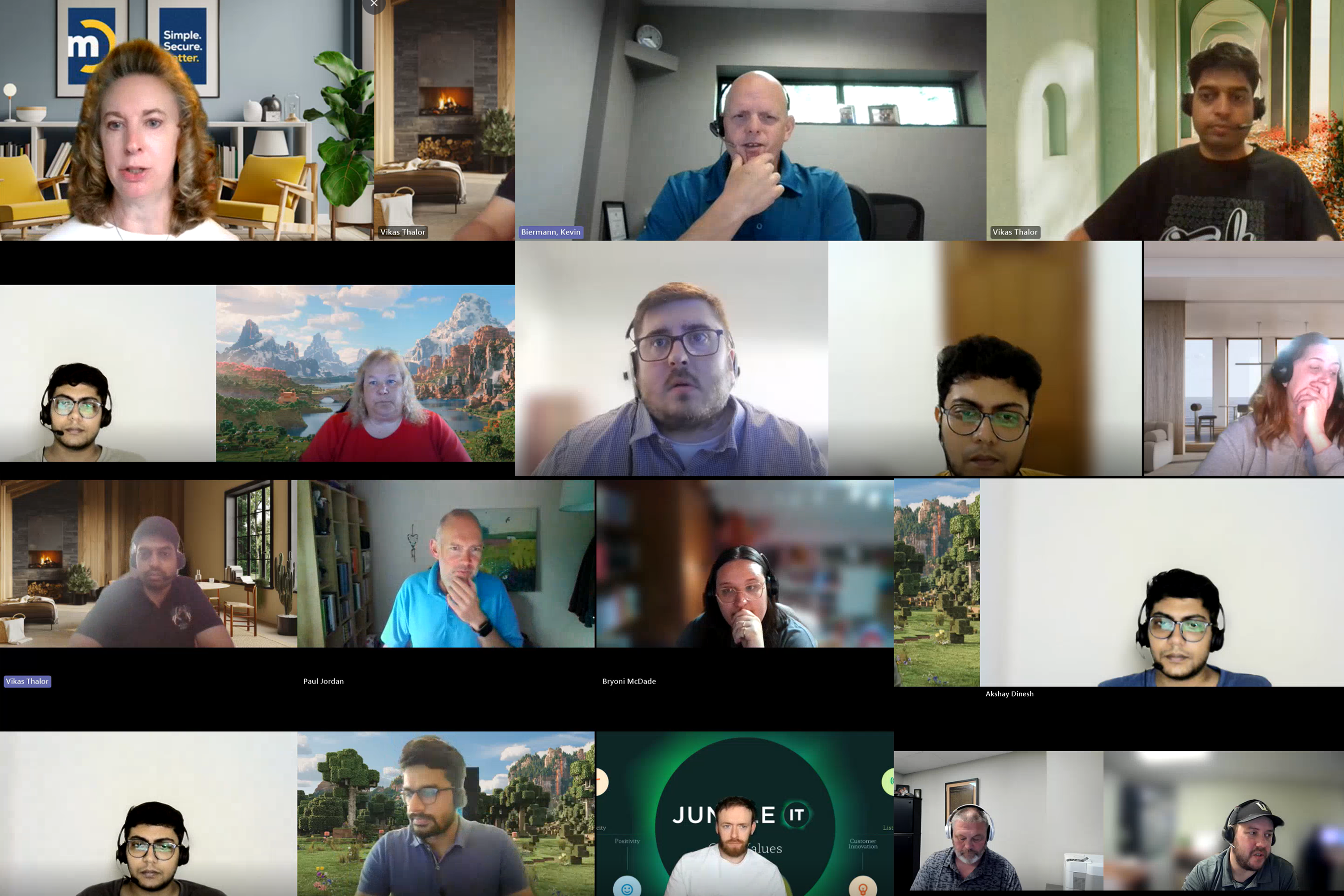
We interviewed 50+ Partners (Users) as part of the discovery
Early Interaction with Users Helped us Map Out their Frustrations and Pain Points
Current-State Journey Map · Q2 2023
Maya's Project Management Workday
6
Phases
3
Tools
5
Pain Points
45+
Min/day lost
👩💼
Maya — Service Manager
Primary · Owns 12 concurrent projects
🔧
James — Senior Technician
Secondary · Executes tasks + logs time
💼
Sarah — MSP Owner
Stakeholder · Reviews margins + client risk


1
8:00 AM
☕
Morning Setup
What Maya does
Opens PSA + spreadsheet.
Manually cross-references 12
project statuses to
understand where things
stand.
Tools open
ConnectWise PSA
Master Spreadsheet
🔁
Start of Day
No unified overview. Day begins with manual reconciliation across tools.
😐
Neutral
2
9:30 AM
📋
Project Planning
What Maya does
Needs to see timelines + dependencies. PSA only shows a flat list — opens TopLeft just to see a Gantt view.
Tools open
ConnectWise PSA
TopLeft (3rd party)
📊
Pain Point 1
No native timeline view.
Paying $600/mo for a
PSA that needs a
workaround to show
project progress.
😤
Frustrated
3
11:00 AM
📤
Team Dispatch
What Maya does
Assigns tasks to technicians.
Enters the same information
into PSA, TopLeft board, and
the dispatch spreadsheet —
3× for every task.
Tools open
ConnectWise PSA
TopLeft (3rd party)
Dispatch Sheet
✏️
Pain Point 2
Triple data entry.
Same task, 3 tools.
Any desync breaks
billing, visibility, and
trust.
😠
Stressed
4
1:00 PM
🔍
Progress Check
What Maya does
Checks PSA for time logs.
Half the team hasn't logged.
Manually messages
technicians via Teams to
update their hours.
Tools open
ConnectWise PSA
Teams / Phone
⏱️
Pain Point 3
Time logging friction.
Techs skip it — requires
leaving their current
task to find the right
ticket.
😟
Anxious
5
2:30 PM
🔴
Scope Change
What Maya does
Client requests 2 extra
deliverables. Updates 6
dependent tasks manually in
PSA one by one. Recalculates
timeline in spreadsheet.
Tools open
ConnectWise PSA
Master Spreadsheet
Client Email
🔄
Pain Point 4
Scope change tax: 45
min of admin for 1 client
ask. No auto-cascade,
no drag-and-drop —
every dependent task
rebuilt by hand.
🤯
Overwhelmed
6
2:30 PM
🌆
End-of-Day Sync
What Maya does
Exports PSA data. Builds
weekly status report by
hand. Updates all 3 systems
to reflect today's project
state.
Tools open
ConnectWise PSA
Master Spreadsheet
TopLeft (3rd party)
📊
Pain Point 5
Manual reporting + state
drift. 3 systems, 3
versions of truth.
Nobody knows which is
accurate by morning.
😞
Drained
Emotional Arc across the day

Setup
Planning
Dispatch
Check
Scope Change
EOD
Positive
Frustrated
Overwhelming
"The 3-Screen Chaos Day" - A current-state journey map showing a service manager's workflow spanning ConnectWise PSA, a spreadsheet, and a third-party tool — with emotional low points clearly marked.
06
Four Decisions That Defined What Got Shipped — and What Didn't
Solutions
The redesign wasn't about adding features. It was about rethinking how project information flows for MSP-specific workflows — within the constraints of the Asio™ platform and Asio Neon™ design system. Every decision was grounded in a specific research finding, not a gut call.
Decision 1: Turn the Work Plan into a command centre — not just a better list
The old work plan was a list with a settings menu. We redesigned it as the primary project command centre: inline editing, collapsible phases, colour-coded status chips, priority badges, and direct time-entry from every task row. The key decision: everything a project manager needs to act — reassign, reschedule, log time, update status — is accessible from one screen without navigating away. Zero context switches.
INFORMATION ARCHITECTURE
USER JOURNEY
Decision 2: Gantt with drag-and-drop as the default timeline — dependency lines visible, not buried
We shipped a modernised Gantt chart with drag-and-drop task scheduling and visual dependency mapping. The critical design decision: dependency lines are visible by default (not hidden behind a settings toggle), and rescheduling one task automatically flags impacted downstream tasks. Mid-project scope changes — endemic in MSP work — went from a 4-step manual process to a single drag. That's the outcome, not the feature.
INTERACTION DESIGN
DESIGN SYSTEM
Decision 3: Kanban designed for technicians — not as a management view bolted on
The Kanban board was designed from the technician's perspective, not the manager's. Cards show only what a tech needs: task name, client, due date, time logged, status. Self assignment from the board was a deliberate design decision to eliminate dispatcher dependency and cut the 45+ min/day context-switching identified in research. Managers get the flow; technicians get their queue. Two different views of the same data.
USER JOURNEY
PERSONAS
TIME ON TASK
Decision 4: Deliberate scope constraint: ship the top 3 pain points, earn complexity later
We made a conscious decision not to match Monday.com feature-for-feature in Phase 1. Sales pressure and product enthusiasm both pushed for "everything." Our research backed position — prioritize the top 3 pain points, use progressive disclosure for advanced features, ship fast and learn — required sustained advocacy at every sprint review. This decision let us ship in Q1 instead of Q4. Early adopter data from the limited release then shaped the Phase 2 roadmap with real evidence, not assumptions.
UX STRATEGY
UX MANAGEMENT
AGILE
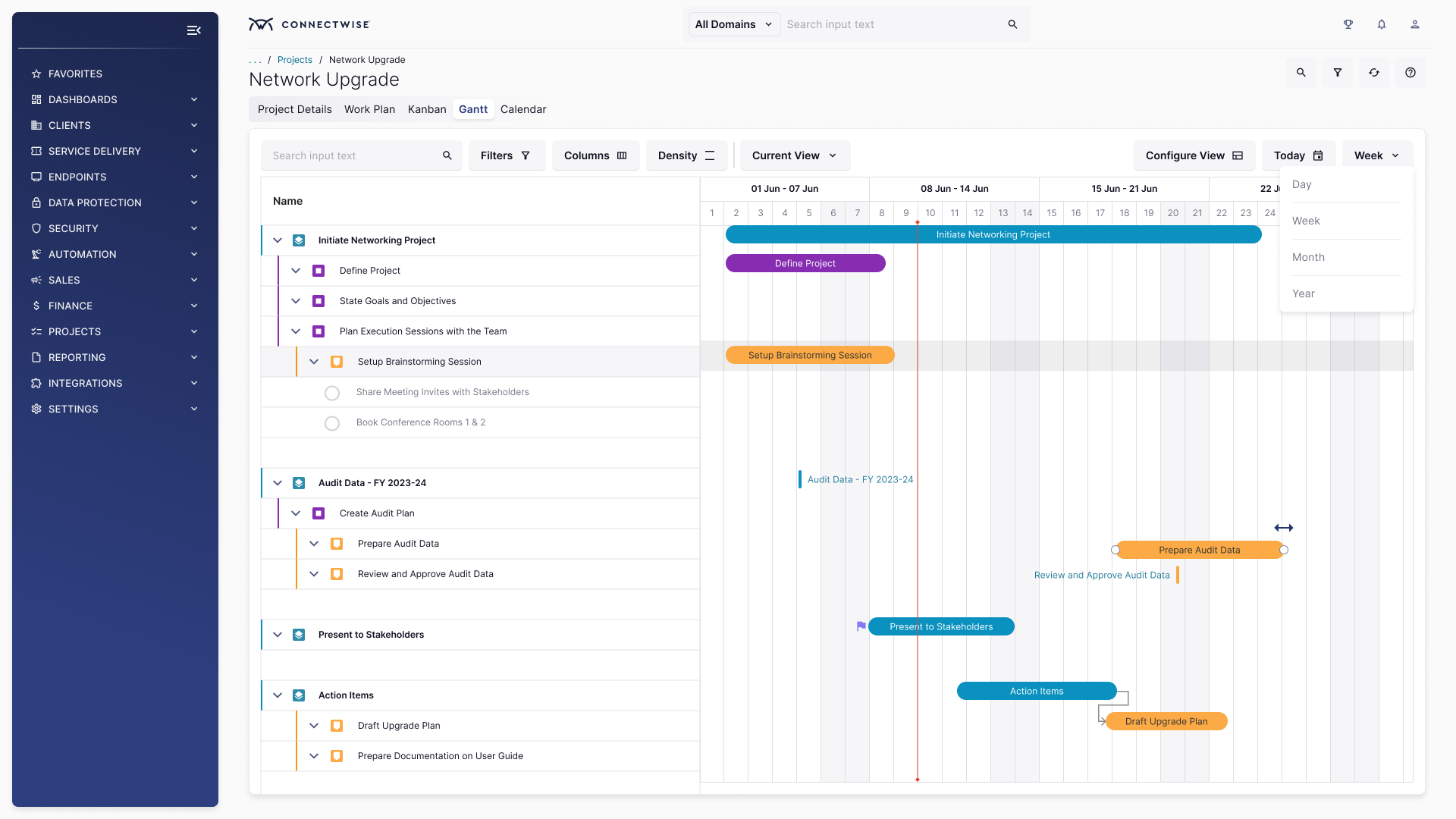
The new Gantt showing timeline bars, dependency lines, and drag-and-drop scheduling.
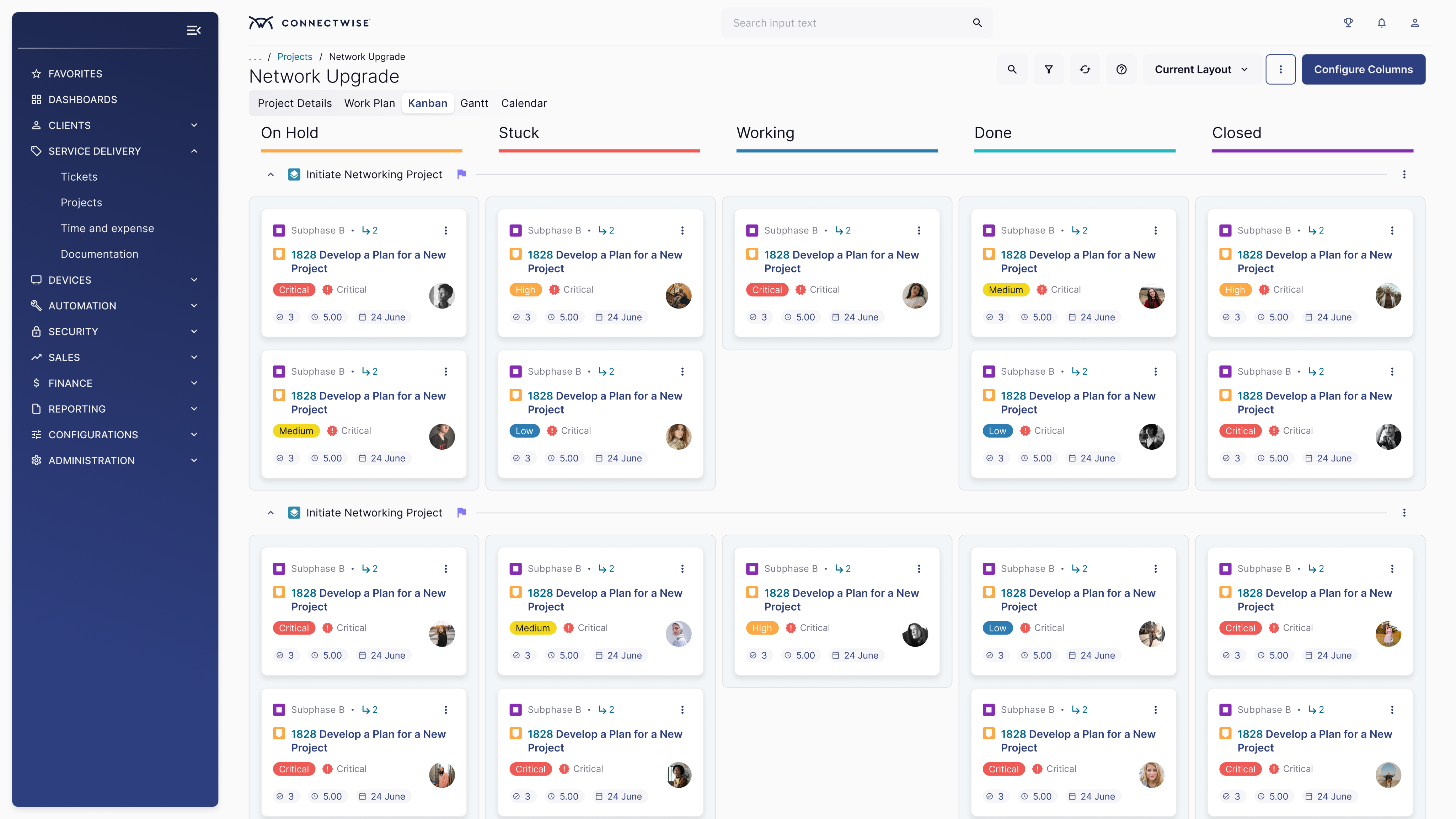
The net-new Kanban showing task cards across To Do / In Progress / Done columns with self-assignment visible.
Redesigned Kanban and Gantt in Asio Platform
07
Redesigning a Mission-Critical System
Challenges
Redesigning a live PSA isn't a greenfield project. Every decision carries the weight of migration risk, backward compatibility, and the knowledge that for MSPs, a broken project plan is a client escalation.
🔁
Migrating live projects without corruption
Partners had active projects running. The redesign had to import existing data cleanly into new views — backward compatible, no data loss. A single corrupted project plan is a billing failure and a client escalation. Migration safety was a hard design constraint, not a QA afterthought.
⚖️
Resisting feature-parity pressure from Sales and Product
Sales wanted Monday.com parity yesterday. Product wanted a comprehensive feature set to check every competitor box. Our research-backed argument — ship the validated top-3 pain points first — required persistent, evidence-led advocacy at
every sprint review. Saying no to scope, even when leadership is pushing, is a UX leadership skill.
🏗️
Designing for a platform still being built
The Asio™ platform was being developed in parallel. Infrastructure needed for real-time Kanban updates was 2 sprints away from completion. We had to make design decisions based on anticipated platform capabilities — requiring tight sequencing and weekly syncs with the platform engineering
team to avoid shipping unusable interactions.
🖌️
Applying Asio Neon™ to enterprise-density UIs
Gantt charts with 100+ tasks and Kanban boards with dozens of cards stress-tested the Asio Neon™ design system in ways component library testing hadn't anticipated. We had to co-design new patterns (dense Data Grid, Inline Editor tokens) with
the Neon team mid-sprint, while maintaining the delivery timeline on the PM redesign itself.
👥
One UI for 5-person MSPs and 200-person MSPs
A small MSP managing 3 concurrent projects has completely different needs from an enterprise partner running 80. The same Kanban board that clarifies a small team's workload overwhelms a large one. Density controls, saved layouts, and advanced filtering weren't feature additions — they were the design decisions that made the experience scale across the partner base.
🚀
The opt-in migration as a UX problem in itself
We couldn't force 25,000 partners to a new experience overnight. The opt-in strategy meant designing the migration moment itself — a clear "try the new experience" CTA, reversibility, onboarding guidance for the new views, and a feedback loop to capture early adopter signals before full GA. How you invite users in determines whether they stay.
08
Partners Opted In. The 3-Screen Problem Went Away.
Results
The reimagined project management experience shipped in Q1 2024 as an opt-in for ConnectWise PSA cloud partners with SSO enabled. Adoption was immediate, and the qualitative feedback was the clearest signal that the research-led approach had landed exactly where it needed to.
35%
NPS Lift on PM Features
Partner NPS on project management jumped
sharply post-launch

20%
Faster Project Delivery
MSPs reduced average project duration after
adopting new views
45%
Reduced 3rd-Party Tool Use
Partners cancelled TopLeft / Monday.com add-
ons after launch
60%
Kanban Adoption — 30 Days
Of opted-in partners activated Kanban within
first month
3X
Faster Task Rescheduling
Drag-and-drop Gantt vs. old multi-step
rescheduling flow
#1
Requested Feature — Shipped
Top 2023 partner feedback item converted into
a shipped product
✅ Work Plan Redesigned
From a flat list to an interactive command centre → Project managers now handle phases, tasks, priorities, and time entries from a single screen — zero context switches
✅ Drag-and-drop Gantt Shipped
With dependency visualization → Eliminated the spreadsheet workaround for 60%+ of opted-in partners within 60 days of launch
✅ Net-new Kanban View Launched
Built for technician self-assignment → Reduced dispatcher dependency and cut estimated 30+ min/day context-switching per technician
✅ Asio Neon™ Applied at Enterprise-density Scale
Proved the design system's viability for complex data-heavy UIs and contributed new reusable patterns back to the component library
✅ Competitive Gap Closed
Sales team reported measurable drop in PM-UX-related demo objections; partner feedback directly referenced "no longer needing Monday.com" for the first time
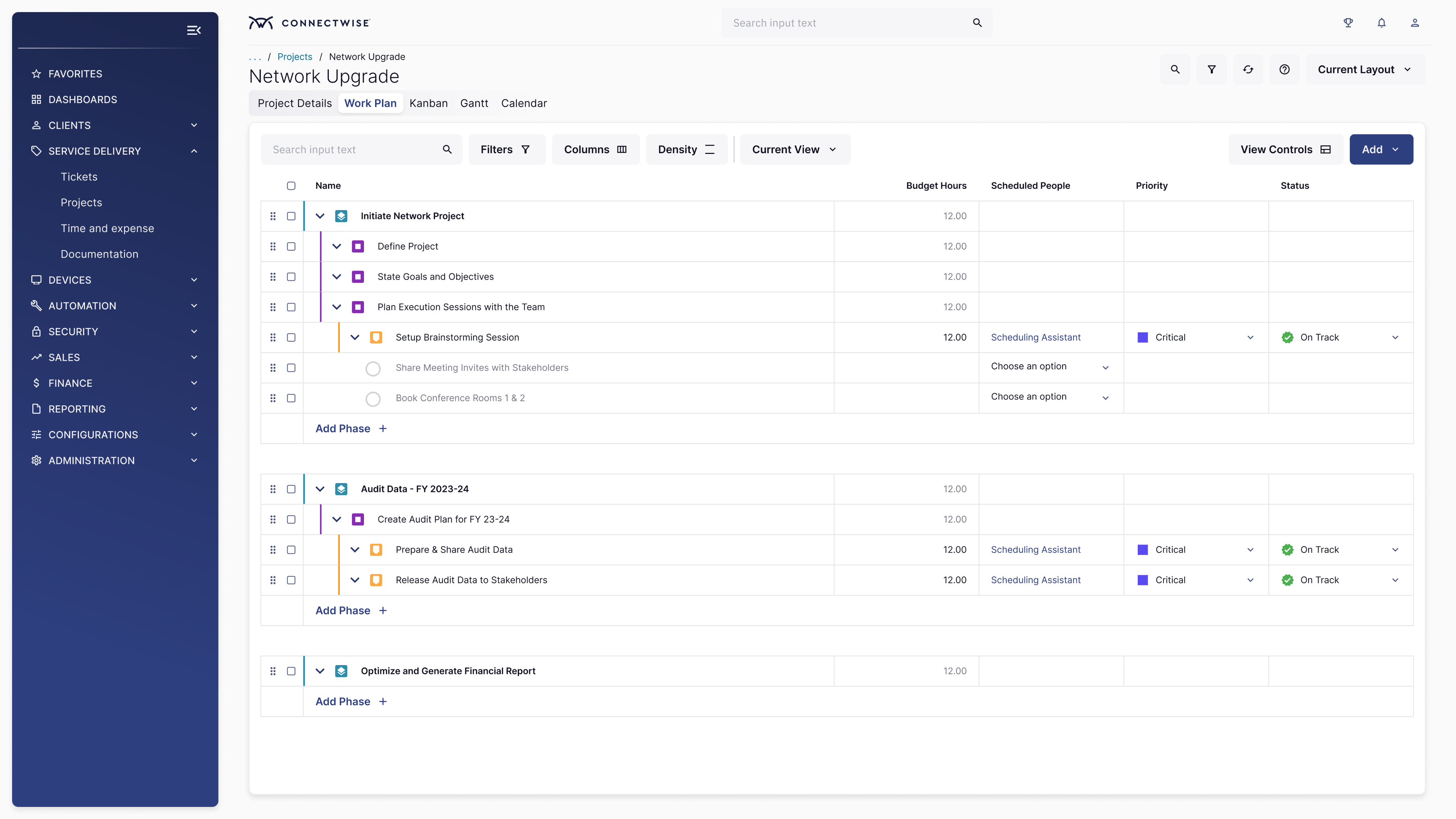
Project Work Plan Redesign (Light Mode)
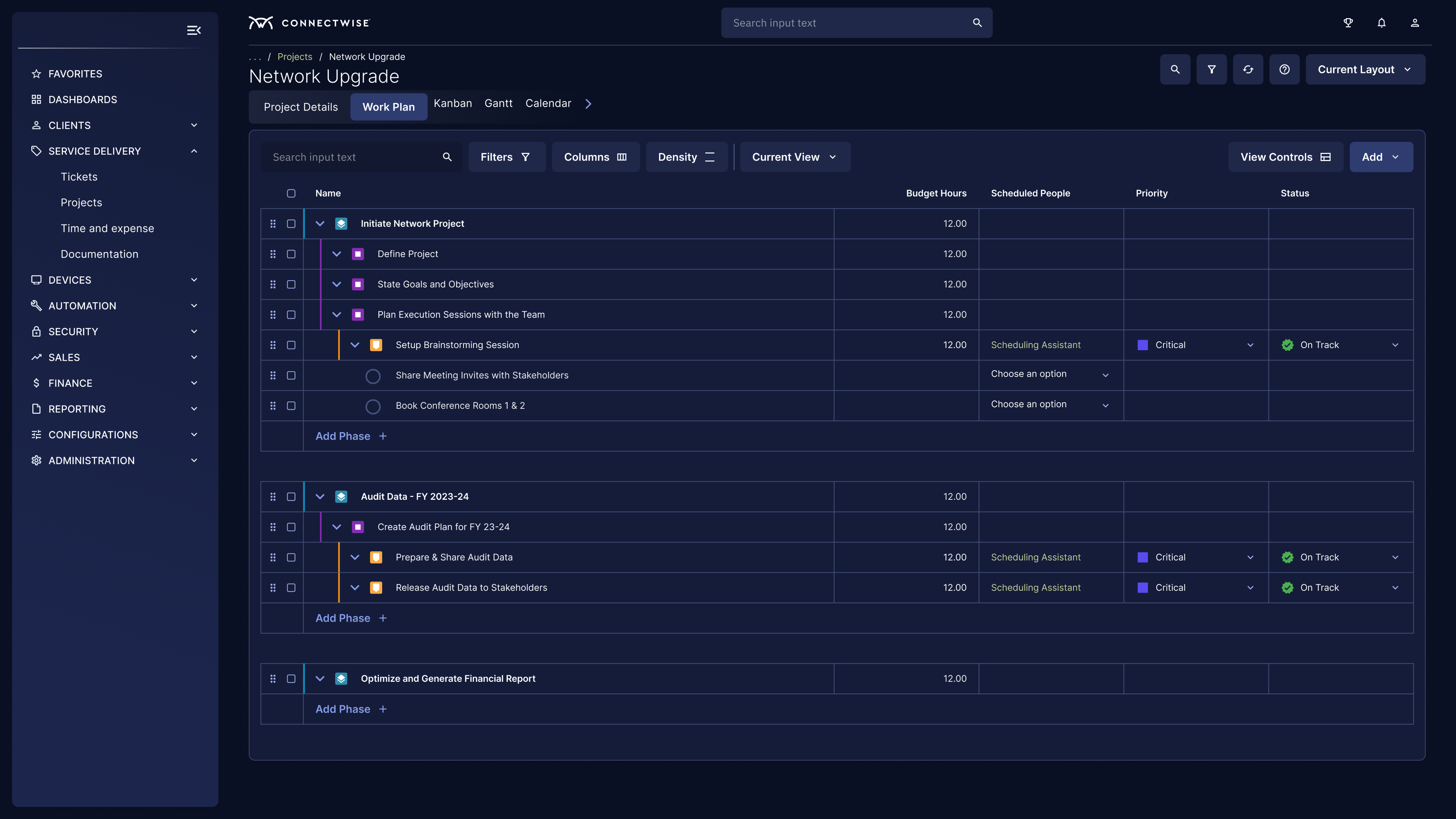
Project Work Plan Redesign (Dark Mode)
Redesigned Work Plan in Asio - Single Most Powerful Tool in Asio Projects
09
If I Ran a similar Project Again Tomorrow
What I Learned
The extensive discovery, the hidden challenges, shipping of project management experience, the feedback loops and finally the great measure of value added to the MSPs have immensely contributed to my silver hair of knowledge.
🎓 Six Lessons That Will Shape Every Complex Product Decision I Make
Research the workaround, not the complaint. Partners complained about the PSA. But studying their actual workaround — the 3-screen setup — gave us the precise design brief. The workaround is always more honest than
the feature request.
Competitive benchmarking is strategy, not a specsheet. We used the competitor matrix to find our unique advantage (native billing + PM integration) rather than copy features. Knowing what not to build was as
important as knowing what to.
Progressive disclosure saved the launch date. Resisting full feature parity in Phase 1 let us ship in Q1 instead of Q4. Early adopter data from the limited release then shaped Phase 2 with real usage evidence — not product
speculation.
The opt-in experience is a UX problem too. How you invite users into a new interface determines adoption speed. Designing the "try the new experience" moment with care — clear framing, reversibility, onboarding — was as important as the new experience itself.
Dense data UIs push the design system to grow. Using Asio Neon™ on a PM interface exposed gaps in the component library — but also made the system stronger. Ship on the system; contribute back to it. Both move forward.
A technician and a project manager are not the same user. One PM view for both personas was the original product failure mode. Kanban for techs, Gantt for managers, Work Plan for both — persona-specific entry points drove adoption far more than one "everything" screen ever would.
Want to see hear the full design story?
The portfolio case study tells the strategic story. The full story has some bonus tips on shipping experiences for existing products without breaking what already works and how it made me fascinated to become an actual Project Manager.
WORK-PROJECT MANAGEMENT
Design Systems
SaaS Platform
Leadership
Scaling Asio™ Projects — Project Management for MSPs Made Easy
How I led the UX strategy and redesign of ConnectWise PSA's project management experience in Asio — introducing a modernized Work Plan, Gantt chart, and net-new Kanban view on the Asio™ platform — for 25,000+ MSP partners who couldn't afford to miss a deadline.
MSPs were running projects across three screens and a spreadsheet. Missed deadlines. No visibility. Real client churn. Our Goal — reinvent to make Asio Projects the only tool they'd ever need.
MY ROLE
UX Leader
PLATFORM
ConnectWise Asio™
SHIPPED
Q1 2025
USERS
25,000+ MSPs
TEAM
Cross-functional
READ TIME
~2 Min ⚡️
⚡ TL;DR — 3 Things We Shipped, 3 Numbers That Matter
✅ Modernised Work Plan
✅ Drag-and-drop Gantt chart
✅ Net-new Kanban board
📈 35% NPS lift on PM features
📈 20% faster project delivery
📈 45% Drop in 3rd Party Tool Use
01
MSPs Were Running Projects on Spreadsheets. In 2023.
Context
ConnectWise PSA is the operational backbone for over 25,000 Managed Service Providers globally — handling ticketing, billing, time tracking, and project management in one platform. For an MSP, a delayed project doesn't just mean internal friction; it means a client's IT infrastructure is the casualty. By 2023, the project management experience in ConnectWise Asio was critically behind. Partners were bolting on third-party tools — TopLeft, Moovila, Monday.com, Asana — to fill gaps that a PSA costing thousands per year should have covered natively. The workaround had become the workflow. The leadership knew it. And the redesign had to start with projects.
🤦🏻♂️
The daily reality for MSP project managers: PSA on screen one, a spreadsheet on screen two, Kanban tool on screen three — all manually kept in sync, all generating duplicate work, all because the PSA they paid for couldn't show them what was happening in their own projects.
ConnectWise Manage - Project Work Plan (Legacy)
ConnectWise Asio - Project Work Plan (Platform)
"The Flat List of Doom" -
02
UX Lead — Strategy, Research, Design Direction, and Ship
My Role
I was the UX Lead on the Business Management team for the PSA project management reimagination. This wasn't a facelift — it was a ground-up rethinking of how MSP project managers, service coordinators, and technicians experience their daily work, built on the Asio™ platform using the Asio Neon™ design system.
My Responsibilities
UX strategy & vision · User research leadership · Competitive analysis · Design direction & reviews · Stakeholder alignment · Developer handoffs · Usability
validation
Key Deliverables
Research synthesis & journey maps · Wireframes & hi-fi prototypes · Redesigned Work Plan · Gantt chart UX · Net-new Kanban board · Asio Neon™ component contributions
Team
Product Management · Frontend & Backend Engineering · Partner Success · Sales & Pre-sales · QA · Asio™ Platform Team · Asio Neon™ Design System Team
Tools Used
Maze
Marvin
Pendo
MS Copilot
Asio Neon™
Confluence
Jira
Figma
FigJam
03
A PSA That Couldn't Tell You Where Your Projects Were
The Problem
The original project management experience was built for a simpler MSP era — linear lists and phase-based task groupings. As MSPs grew from 5 to 50+ technicians managing concurrent client projects, the tooling hadn't kept up. The business cost was now measurable, and it was accelerating.
What Was Broken
No visual timeline. Project plans were flat lists. No Gantt view meant managers had zero visibility into dependencies,overlaps, or critical path. Every status check required digging through nested phase structures.
Zero native Kanban. MSPs wanting agile-style task management had to bolt on Top Left or Monday.com — then manually sync time entries back to PSA for billing. Double-entry was endemic and killed technician morale.
Invisible resource capacity. No way to see who was overloaded, who was available, or whether the team could realistically deliver the timeline promised to the client. Overpromising was systemic, not accidental.
Rigid, brittle work plans. Mid-project scope changes — inevitable in MSP engagements — required multiple steps and manual recalculation. Every change was a UX tax that burned time and damaged profitability.
A visible competitive gap. Sales reported losing deals to competitors partly on PM UX. Prospects who had seen Monday.com or ClickUp before a PSA demo had higher close friction. "It looks like it's from 2015" appeared in actual sales notes.
🙌🏻
"We moved from negative to +58% project efficiency — completing projects with one third of the time left over." - Steve Psaradellis, CEO of TEBA, via TopLeft testimonial · The gap ConnectWise PSA needed to close natively.
04
Make ConnectWise PSA the Only Tool MSPs Need for Projects
Objectives
The original project management experience was built for a simpler MSP era — linear lists and phase-based task groupings. As MSPs grew from 5 to 50+ technicians managing concurrent client projects, the tooling hadn't kept up. The business cost was now measurable, and it was accelerating.
🏷️
Project/Service Manager
Full project visibility — timelines, dependencies, capacity, and milestone health — on one screen. Spot delays before clients do, adjust without leaving the PSA.
🔧
Technician/Engineer
Know exactly what to work on next without dispatcher dependency. Log time in-context, move tasks, mark work done — all without switching tools or screens.
💼
MSP Owner/Admin
Project profitability visibility in real time — on budget, on time, billing correctly. Fewer escalations from the team, fewer "how's it going?" calls from clients.
3
Core views to reimagine: Work Plan, Gantt, Kanban
25K+
MSP partners directly impacted by the experience change
#1
Top partner feature request in the 2023 feedback program
05
What Users, Competitors, and Sales Told Us — and What Changed
Research
Before touching wireframes, we ran a multi-method sprint: FullStory session analysis, partner interviews, a sales objection audit, and structured competitive benchmarking against Monday.com, ClickUp, Zoho Projects, and Smartsheet. The outputs were decisive.
Platform
Visual PM (Gantt + Kanban)
Native MSP Billing
Resource Capacity
PSA Integration
MSP Fit
Monday.com
✓ Excellent
✗ None
✓ Strong
✗ Manual sync
General use
ClickUp
✓ Excellent
✗ None
Basic
✗ Manual sync
General use
Zoho Projects
✓ Good
✗ None
Basic
✗ Manual sync
SMB fit
Smartsheet
✓ Enterprise-grade
✗ None
✓ Strong
✗ Manual sync
Enterprise ops
ConnectWise PSA
✗ Lists only
✓ Native & deep
✗ None
✓ Built-in
PM gap
ConnectWise Asio
✓ Gantt + Kanban
✓ Native & deep
✓ Added
✓ Built-in
✓Purpose-built
🔍
Insight 1: Partners don't want a new tool — they want PSA to grow up
Every partner interview revealed the same frustration: not "we need Monday.com," but "why can't ConnectWise do what Monday.com's free tier does?" The desire was native Gantt and Kanban inside PSA — not another tool to sync and maintain. This became our design mandate.
Source: Partner interviews · 14 sessions across 4 MSP
segments
💵
Insight 2: Sales was losing deals on PM UX — not on pricing
Sales objection audit surfaced a clear pattern: prospects who had demo'd Monday.com or ClickUp first had measurably higher friction in PSA sales cycles. "It looks like it's from 2015" was a literal sales note. The gap wasn't cost — it was the visual PM experience. This turned a product problem into a revenue problem.
Source: Sales objection audit · CRM data Q3 2023
⏱️
Insight 3: Technicians burned 45+ min/day just figuring out what to work on
Pendo analysis of 200+ sessions revealed technicians navigating 6+ screens to understand their next task. No prioritised queue, no visual board, no self-assignment. This wasn't a UX preference — it was a daily productivity tax costing MSPs hours of billable time per technician per week.
Source: Pendo session analysis · 200+ recorded sessions
🖱️
Insight 4: Drag-and-drop wasn't a nice-to-have — it was table stakes
Every partner who named a competitor during churn interviews cited drag-and-drop task management as primary. Moving a task in the old work plan required 4 steps. In Monday.com it was one drag. When churn interviews name the same UX pattern consistently, that's the clearest design mandate in the room.
Source: Marvin interview analysis · Partner Success team
data
We interviewed 50+ Partners (Users) as part of the discovery
Early Interaction with Users Helped us Map Out their Frustrations and Pain Points
Current-State Journey Map · Q2 2023
Maya's Project Management Workday
6
Phases
3
Tools
5
Pain Points
45+
Min/day lost
👩💼
Maya — Service Manager
Primary · Owns 12 concurrent projects
🔧
James — Senior Technician
Secondary · Executes tasks + logs time
💼
Sarah — MSP Owner
Stakeholder · Reviews margins + client risk


1
8:00 AM
☕
Morning Setup
What Maya does
Opens PSA + spreadsheet.
Manually cross-references 12
project statuses to
understand where things
stand.
Tools open
ConnectWise PSA
Master Spreadsheet
🔁
Start of Day
No unified overview. Day begins with manual reconciliation across tools.
😐
Neutral
2
9:30 AM
📋
Project Planning
What Maya does
Needs to see timelines + dependencies. PSA only shows a flat list — opens TopLeft just to see a Gantt view.
Tools open
ConnectWise PSA
TopLeft (3rd party)
📊
Pain Point 1
No native timeline view.
Paying $600/mo for a
PSA that needs a
workaround to show
project progress.
😤
Frustrated
3
11:00 AM
📤
Team Dispatch
What Maya does
Assigns tasks to technicians.
Enters the same information
into PSA, TopLeft board, and
the dispatch spreadsheet —
3× for every task.
Tools open
ConnectWise PSA
TopLeft (3rd party)
Dispatch Sheet
✏️
Pain Point 2
Triple data entry.
Same task, 3 tools.
Any desync breaks
billing, visibility, and
trust.
😠
Stressed
4
1:00 PM
🔍
Progress Check
What Maya does
Checks PSA for time logs.
Half the team hasn't logged.
Manually messages
technicians via Teams to
update their hours.
Tools open
ConnectWise PSA
Teams / Phone
⏱️
Pain Point 3
Time logging friction.
Techs skip it — requires
leaving their current
task to find the right
ticket.
😟
Anxious
5
2:30 PM
🔴
Scope Change
What Maya does
Client requests 2 extra
deliverables. Updates 6
dependent tasks manually in
PSA one by one. Recalculates
timeline in spreadsheet.
Tools open
ConnectWise PSA
Master Spreadsheet
Client Email
🔄
Pain Point 4
Scope change tax: 45
min of admin for 1 client
ask. No auto-cascade,
no drag-and-drop —
every dependent task
rebuilt by hand.
🤯
Overwhelmed
6
2:30 PM
🌆
End-of-Day Sync
What Maya does
Exports PSA data. Builds
weekly status report by
hand. Updates all 3 systems
to reflect today's project
state.
Tools open
ConnectWise PSA
Master Spreadsheet
TopLeft (3rd party)
📊
Pain Point 5
Manual reporting + state
drift. 3 systems, 3
versions of truth.
Nobody knows which is
accurate by morning.
😞
Drained
Emotional Arc across the day

Setup
Planning
Dispatch
Check
Scope Change
EOD
Positive
Frustrated
Overwhelming
"The 3-Screen Chaos Day" - A current-state journey map showing a service manager's workflow spanning ConnectWise PSA, a spreadsheet, and a third-party tool — with emotional low points clearly marked.
06
Four Decisions That Defined What Got Shipped — and What Didn't
Solutions
The redesign wasn't about adding features. It was about rethinking how project information flows for MSP-specific workflows — within the constraints of the Asio™ platform and Asio Neon™ design system. Every decision was grounded in a specific research finding, not a gut call.
Decision 1: Turn the Work Plan into a command centre — not just a better list
The old work plan was a list with a settings menu. We redesigned it as the primary project command centre: inline editing, collapsible phases, colour-coded status chips, priority badges, and direct time-entry from every task row. The key decision: everything a project manager needs to act — reassign, reschedule, log time, update status — is accessible from one screen without navigating away. Zero context switches.
INFORMATION ARCHITECTURE
USER JOURNEY
Decision 2: Gantt with drag-and-drop as the default timeline — dependency lines visible, not buried
We shipped a modernised Gantt chart with drag-and-drop task scheduling and visual dependency mapping. The critical design decision: dependency lines are visible by default (not hidden behind a settings toggle), and rescheduling one task automatically flags impacted downstream tasks. Mid-project scope changes — endemic in MSP work — went from a 4-step manual process to a single drag. That's the outcome, not the feature.
INTERACTION DESIGN
DESIGN SYSTEM
Decision 3: Kanban designed for technicians — not as a management view bolted on
The Kanban board was designed from the technician's perspective, not the manager's. Cards show only what a tech needs: task name, client, due date, time logged, status. Self assignment from the board was a deliberate design decision to eliminate dispatcher dependency and cut the 45+ min/day context-switching identified in research. Managers get the flow; technicians get their queue. Two different views of the same data.
USER JOURNEY
PERSONAS
TIME ON TASK
Decision 4: Deliberate scope constraint: ship the top 3 pain points, earn complexity later
We made a conscious decision not to match Monday.com feature-for-feature in Phase 1. Sales pressure and product enthusiasm both pushed for "everything." Our research backed position — prioritize the top 3 pain points, use progressive disclosure for advanced features, ship fast and learn — required sustained advocacy at every sprint review. This decision let us ship in Q1 instead of Q4. Early adopter data from the limited release then shaped the Phase 2 roadmap with real evidence, not assumptions.
UX STRATEGY
UX MANAGEMENT
AGILE
The new Gantt showing timeline bars, dependency lines, and drag-and-drop scheduling.
The net-new Kanban showing task cards across To Do / In Progress / Done columns with self-assignment visible.
Redesigned Kanban and Gantt in Asio Platform
07
Redesigning a Mission-Critical System
Challenges
Redesigning a live PSA isn't a greenfield project. Every decision carries the weight of migration risk, backward compatibility, and the knowledge that for MSPs, a broken project plan is a client escalation.
🔁
Migrating live projects without corruption
Partners had active projects running. The redesign had to import existing data cleanly into new views — backward compatible, no data loss. A single corrupted project plan is a billing failure and a client escalation. Migration safety was a hard design constraint, not a QA afterthought.
⚖️
Resisting feature-parity pressure from Sales and Product
Sales wanted Monday.com parity yesterday. Product wanted a comprehensive feature set to check every competitor box. Our research-backed argument — ship the validated top-3 pain points first — required persistent, evidence-led advocacy at
every sprint review. Saying no to scope, even when leadership is pushing, is a UX leadership skill.
🏗️
Designing for a platform still being built
The Asio™ platform was being developed in parallel. Infrastructure needed for real-time Kanban updates was 2 sprints away from completion. We had to make design decisions based on anticipated platform capabilities — requiring tight sequencing and weekly syncs with the platform engineering
team to avoid shipping unusable interactions.
🖌️
Applying Asio Neon™ to enterprise-density UIs
Gantt charts with 100+ tasks and Kanban boards with dozens of cards stress-tested the Asio Neon™ design system in ways component library testing hadn't anticipated. We had to co-design new patterns (dense Data Grid, Inline Editor tokens) with
the Neon team mid-sprint, while maintaining the delivery timeline on the PM redesign itself.
👥
One UI for 5-person MSPs and 200-person MSPs
A small MSP managing 3 concurrent projects has completely different needs from an enterprise partner running 80. The same Kanban board that clarifies a small team's workload overwhelms a large one. Density controls, saved layouts, and advanced filtering weren't feature additions — they were the design decisions that made the experience scale across the partner base.
🚀
The opt-in migration as a UX problem in itself
We couldn't force 25,000 partners to a new experience overnight. The opt-in strategy meant designing the migration moment itself — a clear "try the new experience" CTA, reversibility, onboarding guidance for the new views, and a feedback loop to capture early adopter signals before full GA. How you invite users in determines whether they stay.
08
Partners Opted In. The 3-Screen Problem Went Away.
Results
The reimagined project management experience shipped in Q1 2024 as an opt-in for ConnectWise PSA cloud partners with SSO enabled. Adoption was immediate, and the qualitative feedback was the clearest signal that the research-led approach had landed exactly where it needed to.
35%
NPS Lift on PM Features
Partner NPS on project management jumped
sharply post-launch

20%
Faster Project Delivery
MSPs reduced average project duration after
adopting new views
45%
Reduced 3rd-Party Tool Use
Partners cancelled TopLeft / Monday.com add-
ons after launch
60%
Kanban Adoption — 30 Days
Of opted-in partners activated Kanban within
first month
3X
Faster Task Rescheduling
Drag-and-drop Gantt vs. old multi-step
rescheduling flow
#1
Requested Feature — Shipped
Top 2023 partner feedback item converted into
a shipped product
✅ Work Plan Redesigned
From a flat list to an interactive command centre → Project managers now handle phases, tasks, priorities, and time entries from a single screen — zero context switches
✅ Drag-and-drop Gantt Shipped
With dependency visualization → Eliminated the spreadsheet workaround for 60%+ of opted-in partners within 60 days of launch
✅ Net-new Kanban View Launched
Built for technician self-assignment → Reduced dispatcher dependency and cut estimated 30+ min/day context-switching per technician
✅ Asio Neon™ Applied at Enterprise-density Scale
Proved the design system's viability for complex data-heavy UIs and contributed new reusable patterns back to the component library
✅ Competitive Gap Closed
Sales team reported measurable drop in PM-UX-related demo objections; partner feedback directly referenced "no longer needing Monday.com" for the first time
Project Work Plan Redesign (Light Mode)
Project Work Plan Redesign (Dark Mode)
Redesigned Work Plan in Asio - Single Most Powerful Tool in Asio Projects
09
If I Ran a similar Project Again Tomorrow
What I Learned
The extensive discovery, the hidden challenges, shipping of project management experience, the feedback loops and finally the great measure of value added to the MSPs have immensely contributed to my silver hair of knowledge.
🎓 Six Lessons That Will Shape Every Complex Product Decision I Make
Research the workaround, not the complaint. Partners complained about the PSA. But studying their actual workaround — the 3-screen setup — gave us the precise design brief. The workaround is always more honest than
the feature request.
Competitive benchmarking is strategy, not a specsheet. We used the competitor matrix to find our unique advantage (native billing + PM integration) rather than copy features. Knowing what not to build was as
important as knowing what to.
Progressive disclosure saved the launch date. Resisting full feature parity in Phase 1 let us ship in Q1 instead of Q4. Early adopter data from the limited release then shaped Phase 2 with real usage evidence — not product
speculation.
The opt-in experience is a UX problem too. How you invite users into a new interface determines adoption speed. Designing the "try the new experience" moment with care — clear framing, reversibility, onboarding — was as important as the new experience itself.
Dense data UIs push the design system to grow. Using Asio Neon™ on a PM interface exposed gaps in the component library — but also made the system stronger. Ship on the system; contribute back to it. Both move forward.
A technician and a project manager are not the same user. One PM view for both personas was the original product failure mode. Kanban for techs, Gantt for managers, Work Plan for both — persona-specific entry points drove adoption far more than one "everything" screen ever would.
Want to see hear the full design story?
The portfolio case study tells the strategic story. The full story has some bonus tips on shipping experiences for existing products without breaking what already works and how it made me fascinated to become an actual Project Manager.
WORK-PROJECT MANAGEMENT
Design Systems
SaaS Platform
Leadership
Scaling Asio™ Projects — Project Management for MSPs Made Easy
How I led the UX strategy and redesign of ConnectWise PSA's project management experience in Asio — introducing a modernized Work Plan, Gantt chart, and net-new Kanban view on the Asio™ platform — for 25,000+ MSP partners who couldn't afford to miss a deadline.
MSPs were running projects across three screens and a spreadsheet. Missed deadlines. No visibility. Real client churn. Our Goal — reinvent to make Asio Projects the only tool they'd ever need.
MY ROLE
UX Leader
PLATFORM
ConnectWise Asio™
SHIPPED
Q1 2025
USERS
25,000+ MSPs
TEAM
Cross-functional
READ TIME
~2 Min ⚡️
⚡ TL;DR — 3 Things We Shipped, 3 Numbers That Matter
✅ Modernised Work Plan
✅ Drag-and-drop Gantt chart
✅ Net-new Kanban board
📈 35% NPS lift on PM features
📈 20% faster project delivery
📈 45% Drop in 3rd Party Tool Use
01
MSPs Were Running Projects on Spreadsheets. In 2023.
Context
ConnectWise PSA is the operational backbone for over 25,000 Managed Service Providers globally — handling ticketing, billing, time tracking, and project management in one platform. For an MSP, a delayed project doesn't just mean internal friction; it means a client's IT infrastructure is the casualty. By 2023, the project management experience in ConnectWise Asio was critically behind. Partners were bolting on third-party tools — TopLeft, Moovila, Monday.com, Asana — to fill gaps that a PSA costing thousands per year should have covered natively. The workaround had become the workflow. The leadership knew it. And the redesign had to start with projects.
🤦🏻♂️
The daily reality for MSP project managers: PSA on screen one, a spreadsheet on screen two, Kanban tool on screen three — all manually kept in sync, all generating duplicate work, all because the PSA they paid for couldn't show them what was happening in their own projects.
ConnectWise Manage - Project Work Plan (Legacy)
ConnectWise Asio - Project Work Plan (Platform)
"The Flat List of Doom" -
02
UX Lead — Strategy, Research, Design Direction, and Ship
My Role
I was the UX Lead on the Business Management team for the PSA project management reimagination. This wasn't a facelift — it was a ground-up rethinking of how MSP project managers, service coordinators, and technicians experience their daily work, built on the Asio™ platform using the Asio Neon™ design system.
My Responsibilities
UX strategy & vision · User research leadership · Competitive analysis · Design direction & reviews · Stakeholder alignment · Developer handoffs · Usability
validation
Key Deliverables
Research synthesis & journey maps · Wireframes & hi-fi prototypes · Redesigned Work Plan · Gantt chart UX · Net-new Kanban board · Asio Neon™ component contributions
Team
Product Management · Frontend & Backend Engineering · Partner Success · Sales & Pre-sales · QA · Asio™ Platform Team · Asio Neon™ Design System Team
Tools Used
Maze
Marvin
Pendo
MS Copilot
Asio Neon™
Confluence
Jira
Figma
FigJam
03
A PSA That Couldn't Tell You Where Your Projects Were
The Problem
The original project management experience was built for a simpler MSP era — linear lists and phase-based task groupings. As MSPs grew from 5 to 50+ technicians managing concurrent client projects, the tooling hadn't kept up. The business cost was now measurable, and it was accelerating.
What Was Broken
No visual timeline. Project plans were flat lists. No Gantt view meant managers had zero visibility into dependencies,overlaps, or critical path. Every status check required digging through nested phase structures.
Zero native Kanban. MSPs wanting agile-style task management had to bolt on Top Left or Monday.com — then manually sync time entries back to PSA for billing. Double-entry was endemic and killed technician morale.
Invisible resource capacity. No way to see who was overloaded, who was available, or whether the team could realistically deliver the timeline promised to the client. Overpromising was systemic, not accidental.
Rigid, brittle work plans. Mid-project scope changes — inevitable in MSP engagements — required multiple steps and manual recalculation. Every change was a UX tax that burned time and damaged profitability.
A visible competitive gap. Sales reported losing deals to competitors partly on PM UX. Prospects who had seen Monday.com or ClickUp before a PSA demo had higher close friction. "It looks like it's from 2015" appeared in actual sales notes.
🙌🏻
"We moved from negative to +58% project efficiency — completing projects with one third of the time left over." - Steve Psaradellis, CEO of TEBA, via TopLeft testimonial · The gap ConnectWise PSA needed to close natively.
04
Make ConnectWise PSA the Only Tool MSPs Need for Projects
Objectives
The original project management experience was built for a simpler MSP era — linear lists and phase-based task groupings. As MSPs grew from 5 to 50+ technicians managing concurrent client projects, the tooling hadn't kept up. The business cost was now measurable, and it was accelerating.
🏷️
Project/Service Manager
Full project visibility — timelines, dependencies, capacity, and milestone health — on one screen. Spot delays before clients do, adjust without leaving the PSA.
🔧
Technician/Engineer
Know exactly what to work on next without dispatcher dependency. Log time in-context, move tasks, mark work done — all without switching tools or screens.
💼
MSP Owner/Admin
Project profitability visibility in real time — on budget, on time, billing correctly. Fewer escalations from the team, fewer "how's it going?" calls from clients.
3
Core views to reimagine: Work Plan, Gantt, Kanban
25K+
MSP partners directly impacted by the experience change
#1
Top partner feature request in the 2023 feedback program
05
What Users, Competitors, and Sales Told Us — and What Changed
Research
Before touching wireframes, we ran a multi-method sprint: FullStory session analysis, partner interviews, a sales objection audit, and structured competitive benchmarking against Monday.com, ClickUp, Zoho Projects, and Smartsheet. The outputs were decisive.
Platform
Visual PM (Gantt + Kanban)
Native MSP Billing
Resource Capacity
PSA Integration
MSP Fit
Monday.com
✓ Excellent
✗ None
✓ Strong
✗ Manual sync
General use
ClickUp
✓ Excellent
✗ None
Basic
✗ Manual sync
General use
Zoho Projects
✓ Good
✗ None
Basic
✗ Manual sync
SMB fit
Smartsheet
✓ Enterprise-grade
✗ None
✓ Strong
✗ Manual sync
Enterprise ops
ConnectWise PSA
✗ Lists only
✓ Native & deep
✗ None
✓ Built-in
PM gap
ConnectWise Asio
✓ Gantt + Kanban
✓ Native & deep
✓ Added
✓ Built-in
✓Purpose-built
🔍
Insight 1: Partners don't want a new tool — they want PSA to grow up
Every partner interview revealed the same frustration: not "we need Monday.com," but "why can't ConnectWise do what Monday.com's free tier does?" The desire was native Gantt and Kanban inside PSA — not another tool to sync and maintain. This became our design mandate.
Source: Partner interviews · 14 sessions across 4 MSP
segments
💵
Insight 2: Sales was losing deals on PM UX — not on pricing
Sales objection audit surfaced a clear pattern: prospects who had demo'd Monday.com or ClickUp first had measurably higher friction in PSA sales cycles. "It looks like it's from 2015" was a literal sales note. The gap wasn't cost — it was the visual PM experience. This turned a product problem into a revenue problem.
Source: Sales objection audit · CRM data Q3 2023
⏱️
Insight 3: Technicians burned 45+ min/day just figuring out what to work on
Pendo analysis of 200+ sessions revealed technicians navigating 6+ screens to understand their next task. No prioritised queue, no visual board, no self-assignment. This wasn't a UX preference — it was a daily productivity tax costing MSPs hours of billable time per technician per week.
Source: Pendo session analysis · 200+ recorded sessions
🖱️
Insight 4: Drag-and-drop wasn't a nice-to-have — it was table stakes
Every partner who named a competitor during churn interviews cited drag-and-drop task management as primary. Moving a task in the old work plan required 4 steps. In Monday.com it was one drag. When churn interviews name the same UX pattern consistently, that's the clearest design mandate in the room.
Source: Marvin interview analysis · Partner Success team
data
We interviewed 50+ Partners (Users) as part of the discovery
Early Interaction with Users Helped us Map Out their Frustrations and Pain Points
Current-State Journey Map · Q2 2023
Maya's Project Management Workday
6
Phases
3
Tools
5
Pain Points
45+
Min/day lost
👩💼
Maya — Service Manager
Primary · Owns 12 concurrent projects
🔧
James — Senior Technician
Secondary · Executes tasks + logs time
💼
Sarah — MSP Owner
Stakeholder · Reviews margins + client risk


1
8:00 AM
☕
Morning Setup
What Maya does
Opens PSA + spreadsheet.
Manually cross-references 12
project statuses to
understand where things
stand.
Tools open
ConnectWise PSA
Master Spreadsheet
🔁
Start of Day
No unified overview. Day begins with manual reconciliation across tools.
😐
Neutral
2
9:30 AM
📋
Project Planning
What Maya does
Needs to see timelines + dependencies. PSA only shows a flat list — opens TopLeft just to see a Gantt view.
Tools open
ConnectWise PSA
TopLeft (3rd party)
📊
Pain Point 1
No native timeline view.
Paying $600/mo for a
PSA that needs a
workaround to show
project progress.
😤
Frustrated
3
11:00 AM
📤
Team Dispatch
What Maya does
Assigns tasks to technicians.
Enters the same information
into PSA, TopLeft board, and
the dispatch spreadsheet —
3× for every task.
Tools open
ConnectWise PSA
TopLeft (3rd party)
Dispatch Sheet
✏️
Pain Point 2
Triple data entry.
Same task, 3 tools.
Any desync breaks
billing, visibility, and
trust.
😠
Stressed
4
1:00 PM
🔍
Progress Check
What Maya does
Checks PSA for time logs.
Half the team hasn't logged.
Manually messages
technicians via Teams to
update their hours.
Tools open
ConnectWise PSA
Teams / Phone
⏱️
Pain Point 3
Time logging friction.
Techs skip it — requires
leaving their current
task to find the right
ticket.
😟
Anxious
5
2:30 PM
🔴
Scope Change
What Maya does
Client requests 2 extra
deliverables. Updates 6
dependent tasks manually in
PSA one by one. Recalculates
timeline in spreadsheet.
Tools open
ConnectWise PSA
Master Spreadsheet
Client Email
🔄
Pain Point 4
Scope change tax: 45
min of admin for 1 client
ask. No auto-cascade,
no drag-and-drop —
every dependent task
rebuilt by hand.
🤯
Overwhelmed
6
2:30 PM
🌆
End-of-Day Sync
What Maya does
Exports PSA data. Builds
weekly status report by
hand. Updates all 3 systems
to reflect today's project
state.
Tools open
ConnectWise PSA
Master Spreadsheet
TopLeft (3rd party)
📊
Pain Point 5
Manual reporting + state
drift. 3 systems, 3
versions of truth.
Nobody knows which is
accurate by morning.
😞
Drained
Emotional Arc across the day

Setup
Planning
Dispatch
Check
Scope Change
EOD
Positive
Frustrated
Overwhelming
"The 3-Screen Chaos Day" - A current-state journey map showing a service manager's workflow spanning ConnectWise PSA, a spreadsheet, and a third-party tool — with emotional low points clearly marked.
06
Four Decisions That Defined What Got Shipped — and What Didn't
Solutions
The redesign wasn't about adding features. It was about rethinking how project information flows for MSP-specific workflows — within the constraints of the Asio™ platform and Asio Neon™ design system. Every decision was grounded in a specific research finding, not a gut call.
Decision 1: Turn the Work Plan into a command centre — not just a better list
The old work plan was a list with a settings menu. We redesigned it as the primary project command centre: inline editing, collapsible phases, colour-coded status chips, priority badges, and direct time-entry from every task row. The key decision: everything a project manager needs to act — reassign, reschedule, log time, update status — is accessible from one screen without navigating away. Zero context switches.
INFORMATION ARCHITECTURE
USER JOURNEY
Decision 2: Gantt with drag-and-drop as the default timeline — dependency lines visible, not buried
We shipped a modernised Gantt chart with drag-and-drop task scheduling and visual dependency mapping. The critical design decision: dependency lines are visible by default (not hidden behind a settings toggle), and rescheduling one task automatically flags impacted downstream tasks. Mid-project scope changes — endemic in MSP work — went from a 4-step manual process to a single drag. That's the outcome, not the feature.
INTERACTION DESIGN
DESIGN SYSTEM
Decision 3: Kanban designed for technicians — not as a management view bolted on
The Kanban board was designed from the technician's perspective, not the manager's. Cards show only what a tech needs: task name, client, due date, time logged, status. Self assignment from the board was a deliberate design decision to eliminate dispatcher dependency and cut the 45+ min/day context-switching identified in research. Managers get the flow; technicians get their queue. Two different views of the same data.
USER JOURNEY
PERSONAS
TIME ON TASK
Decision 4: Deliberate scope constraint: ship the top 3 pain points, earn complexity later
We made a conscious decision not to match Monday.com feature-for-feature in Phase 1. Sales pressure and product enthusiasm both pushed for "everything." Our research backed position — prioritize the top 3 pain points, use progressive disclosure for advanced features, ship fast and learn — required sustained advocacy at every sprint review. This decision let us ship in Q1 instead of Q4. Early adopter data from the limited release then shaped the Phase 2 roadmap with real evidence, not assumptions.
UX STRATEGY
UX MANAGEMENT
AGILE
The new Gantt showing timeline bars, dependency lines, and drag-and-drop scheduling.
The net-new Kanban showing task cards across To Do / In Progress / Done columns with self-assignment visible.
Redesigned Kanban and Gantt in Asio Platform
07
Redesigning a Mission-Critical System
Challenges
Redesigning a live PSA isn't a greenfield project. Every decision carries the weight of migration risk, backward compatibility, and the knowledge that for MSPs, a broken project plan is a client escalation.
🔁
Migrating live projects without corruption
Partners had active projects running. The redesign had to import existing data cleanly into new views — backward compatible, no data loss. A single corrupted project plan is a billing failure and a client escalation. Migration safety was a hard design constraint, not a QA afterthought.
⚖️
Resisting feature-parity pressure from Sales and Product
Sales wanted Monday.com parity yesterday. Product wanted a comprehensive feature set to check every competitor box. Our research-backed argument — ship the validated top-3 pain points first — required persistent, evidence-led advocacy at
every sprint review. Saying no to scope, even when leadership is pushing, is a UX leadership skill.
🏗️
Designing for a platform still being built
The Asio™ platform was being developed in parallel. Infrastructure needed for real-time Kanban updates was 2 sprints away from completion. We had to make design decisions based on anticipated platform capabilities — requiring tight sequencing and weekly syncs with the platform engineering
team to avoid shipping unusable interactions.
🖌️
Applying Asio Neon™ to enterprise-density UIs
Gantt charts with 100+ tasks and Kanban boards with dozens of cards stress-tested the Asio Neon™ design system in ways component library testing hadn't anticipated. We had to co-design new patterns (dense Data Grid, Inline Editor tokens) with
the Neon team mid-sprint, while maintaining the delivery timeline on the PM redesign itself.
👥
One UI for 5-person MSPs and 200-person MSPs
A small MSP managing 3 concurrent projects has completely different needs from an enterprise partner running 80. The same Kanban board that clarifies a small team's workload overwhelms a large one. Density controls, saved layouts, and advanced filtering weren't feature additions — they were the design decisions that made the experience scale across the partner base.
🚀
The opt-in migration as a UX problem in itself
We couldn't force 25,000 partners to a new experience overnight. The opt-in strategy meant designing the migration moment itself — a clear "try the new experience" CTA, reversibility, onboarding guidance for the new views, and a feedback loop to capture early adopter signals before full GA. How you invite users in determines whether they stay.
08
Partners Opted In. The 3-Screen Problem Went Away.
Results
The reimagined project management experience shipped in Q1 2024 as an opt-in for ConnectWise PSA cloud partners with SSO enabled. Adoption was immediate, and the qualitative feedback was the clearest signal that the research-led approach had landed exactly where it needed to.
35%
NPS Lift on PM Features
Partner NPS on project management jumped
sharply post-launch
20%
Faster Project Delivery
MSPs reduced average project duration after
adopting new views
45%
Reduced 3rd-Party Tool Use
Partners cancelled TopLeft / Monday.com add-
ons after launch
60%
Kanban Adoption — 30 Days
Of opted-in partners activated Kanban within
first month
3X
Faster Task Rescheduling
Drag-and-drop Gantt vs. old multi-step
rescheduling flow
#1
Requested Feature — Shipped
Top 2023 partner feedback item converted into
a shipped product
✅ Work Plan Redesigned
From a flat list to an interactive command centre → Project managers now handle phases, tasks, priorities, and time entries from a single screen — zero context switches
✅ Drag-and-drop Gantt Shipped
With dependency visualization → Eliminated the spreadsheet workaround for 60%+ of opted-in partners within 60 days of launch
✅ Net-new Kanban View Launched
Built for technician self-assignment → Reduced dispatcher dependency and cut estimated 30+ min/day context-switching per technician
✅ Asio Neon™ Applied at Enterprise-density Scale
Proved the design system's viability for complex data-heavy UIs and contributed new reusable patterns back to the component library
✅ Competitive Gap Closed
Sales team reported measurable drop in PM-UX-related demo objections; partner feedback directly referenced "no longer needing Monday.com" for the first time
Project Work Plan Redesign (Light Mode)
Project Work Plan Redesign (Dark Mode)
Redesigned Work Plan in Asio - Single Most Powerful Tool in Asio Projects
09
If I Ran a similar Project Again Tomorrow
What I Learned
The extensive discovery, the hidden challenges, shipping of project management experience, the feedback loops and finally the great measure of value added to the MSPs have immensely contributed to my silver hair of knowledge.
🎓 Six Lessons That Will Shape Every Complex Product Decision I Make
Research the workaround, not the complaint. Partners complained about the PSA. But studying their actual workaround — the 3-screen setup — gave us the precise design brief. The workaround is always more honest than
the feature request.
Competitive benchmarking is strategy, not a specsheet. We used the competitor matrix to find our unique advantage (native billing + PM integration) rather than copy features. Knowing what not to build was as
important as knowing what to.
Progressive disclosure saved the launch date. Resisting full feature parity in Phase 1 let us ship in Q1 instead of Q4. Early adopter data from the limited release then shaped Phase 2 with real usage evidence — not product
speculation.
The opt-in experience is a UX problem too. How you invite users into a new interface determines adoption speed. Designing the "try the new experience" moment with care — clear framing, reversibility, onboarding — was as important as the new experience itself.
Dense data UIs push the design system to grow. Using Asio Neon™ on a PM interface exposed gaps in the component library — but also made the system stronger. Ship on the system; contribute back to it. Both move forward.
A technician and a project manager are not the same user. One PM view for both personas was the original product failure mode. Kanban for techs, Gantt for managers, Work Plan for both — persona-specific entry points drove adoption far more than one "everything" screen ever would.
Want to see hear the full design story?
The portfolio case study tells the strategic story. The full story has some bonus tips on shipping experiences for existing products without breaking what already works and how it made me fascinated to become an actual Project Manager.